The POWER Lens: Designing for Thinking in AI-Supported Classrooms
AI is accelerating a shift in education that has been overdue for a long time. For years, classrooms have largely operated on a familiar model: deliver content, assign tasks, and then step in to support students when they struggle. That model begins to break down when students can generate answers instantly. If a tool can complete the task, then the task was never really about thinking.
So we are no longer asking, How do we stop students from using AI?The better question is: How do we design learning where thinking can’t be outsourced? This is where conversations about ethics and bias need to move out of abstract discussions and into the realities of classroom design.
AI Is Not Neutral, But That’s Not the Whole Story
We often tell students that AI is biased. That it reflects the data it was trained on and can reinforce dominant perspectives. All of that is true, and it matters. But in classrooms, bias shows up in more immediate and practical ways. It’s not only about what AI says. It’s also about how information is structured, how much information is given, and what students are expected to do with it. For many students, especially those who are neurodivergent, this is where access begins to break down.
What AI Actually Learns
In my classroom, we use a simple image classification task inspired by the MIT Day of AI. Students act as the model, working to distinguish between alligators and crocodiles.
Very quickly, they begin to notice patterns. They point out snout shape, whether the animal is in water or on land, color, and even the angle of the image. Then we test the model with a new image. Sometimes, we get the answer “wrong.” In other words, the system behaves exactly the way we designed it to. Students begin to see that AI doesn’t understand concepts. It learns patterns from the data we provide. And human decisions shape those patterns, what we include, what we exclude, and how we label.
From Bias to Design
This is often where the conversation about bias ends. Students recognize that AI reflects its training data. But when they have acted as the model themselves, a different realization starts to emerge. The issue isn’t just that AI is biased. It’s that the system is only as thoughtful as the design behind it.
When students begin using tools like Gemini or NotebookLM, the challenge is not just whether the information is accurate. It’s whether students can actually think with it. And once we start thinking about design, another layer becomes visible: how information is structured for the learner.
Cognitive Load Is an Ethical Issue
Consider three different AI responses to the same prompt. One might be structured and grounded in sources. Another might be broader and more generalized. A third might generate multiple ideas and questions at once. For some students, this is helpful. For others, it is overwhelming.
Too much information at once.
Too many directions to follow.
Language that is dense or abstract.
Multiple questions with no clear entry point.
For students with ADHD, dyslexia, or language processing differences, this can lead to shutdown rather than engagement. If a student cannot process the output, the knowledge is not accessible. Bias is not only about representation. It is also about who is able to participate in thinking, and who is not. Just as students relied on visible patterns in the images, they also rely on patterns in how information is presented to them.
The POWER Lens
To help students move from participating in systems to interrogating them, I use what I call the POWER Lens. It offers a simple structure for questioning AI outputs rather than accepting them at face value.
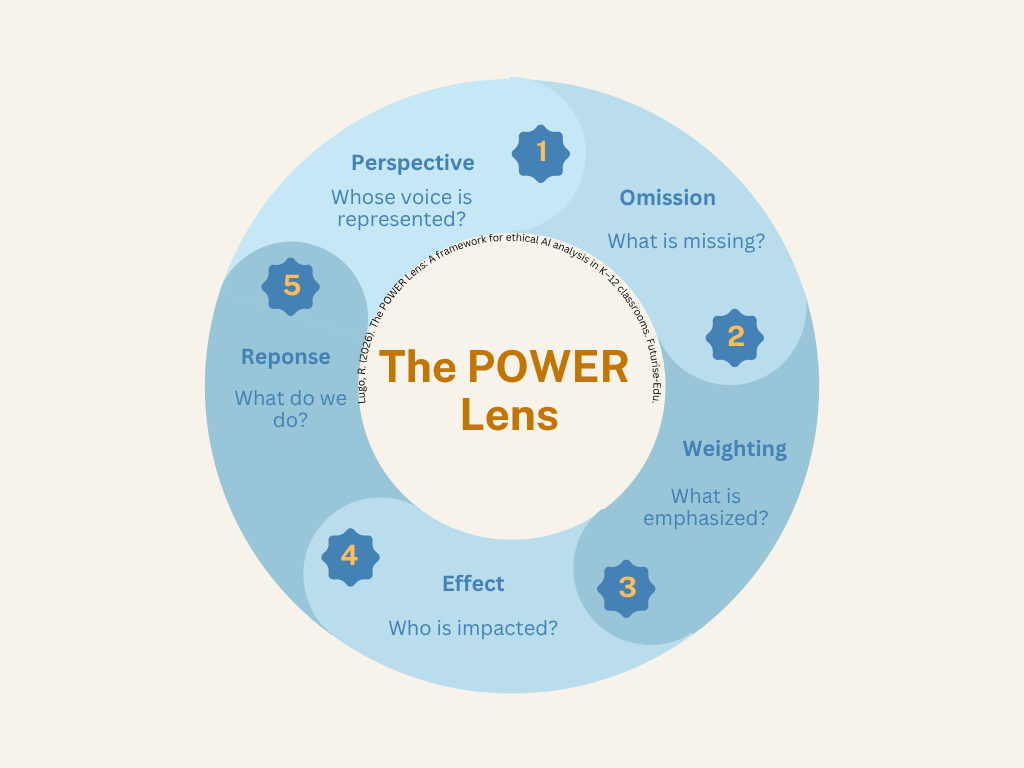
Perspective – Whose voice or viewpoint is represented?
Omission – What is missing?
Weighting – What is emphasized or prioritized?
Effect – Who benefits from this response? Who might be left out?
Response – What should we do with this information?
This is not about teaching students to distrust AI. It is about helping them engage with it more deliberately and critically.
Designing for Thinking, Not Efficiency
There is a growing assumption that AI should make learning faster and easier. However, speed is not the goal. Thinking is. In practice, this means making different design choices. It might mean constraining AI use rather than opening it up. It might mean asking students to evaluate outputs before using them, or requiring them to verify claims with human sources. It often means simplifying and structuring outputs so that students can actually engage with them, rather than becoming overwhelmed.
When this happens, AI shifts from being an answer machine to something more useful: a tool that supports thinking rather than replaces it.
Where This Leaves Us
AI is already part of students’ learning environments. The question is no longer whether it belongs in classrooms. The question is: Will we design for thinking, or will we design for efficiency? Those are not the same thing and the difference matters most for the students who are already at risk of being left out.
A Starting Point
For those beginning this work, small shifts matter.
Ask students what is missing from an AI response.
Slow down how AI is used in your classroom.
Treat outputs as drafts rather than final answers.
Pay attention to who is able to engage, and who is not.
And most importantly: Student thinking is the goal, not the product.
Suggested citation:
Lugo, R. (2026). The POWER Lens: Designing for Thinking in AI-Supported Classrooms. Futurise-Edu.